Guide
What Java Version for Minecraft? The Full Table, Version by Version
Short answer: It depends on the Minecraft version. 26.1 and newer, including 26.3, need Java 25. 1.20.5 through 1.21.11 need Java 21. 1.18 through 1.20.4 need Java 17, 1.17 needs Java 16, and 1.16.5 and older run on Java 8. The official launcher installs the right one by itself; Prism Launcher, the Fabric installer and servers may need you to install it.
Java version checker
Which Java does my Minecraft version need?
Minecraft 26.3 (released 2026-09-15) needs Java 25.
The message names two class file versions; paste it to decode them.
| Minecraft versions | Java | Class file | Releases |
|---|---|---|---|
| 26.1 – 26.3 | Java 25 | 69.0 | 5 |
| 1.20.5 – 1.21.11 | Java 21 | 65.0 | 14 |
| 1.18 – 1.20.4 | Java 17 | 61.0 | 13 |
| 1.17 – 1.17.1 | Java 16 | 60.0 | 2 |
| 1.0 – 1.16.5 | Java 8 | 52.0 | 69 |
What Java version for Minecraft you need is decided by Mojang, not by preference: every Minecraft version's official metadata names exactly one Java major version, and the official launcher downloads that runtime for you. The checker above reads that metadata. Pick your version, or paste the 'class file version' number from an error, and it tells you which Java to use.
Most people only need this page when something outside the official launcher is involved: Prism Launcher or MultiMC, the Fabric or Forge installer, a dedicated server, or an old modpack on 1.20.1 or 1.12.2. Those are covered below, after the full table.
One date matters more than the rest. Since Minecraft 26.1, released in March 2026, the game requires Java 25. Guides written before then that tell you to install Java 21 are out of date for every 26.x version.
The full table
Every row below comes from the javaVersion field in Mojang's version JSON files, which the launcher reads before it starts the game. The component column is the name of the runtime package the official launcher downloads; it is useful when you are reading launcher logs or looking inside the launcher's runtime folder.
| Minecraft version | Java | Launcher runtime component | Class file major version |
|---|---|---|---|
| 26.1, 26.1.1, 26.1.2, 26.2, 26.3 (and 26.4 snapshots) | Java 25 | java-runtime-epsilon | 69 |
| 1.20.5 to 1.21.11 | Java 21 | java-runtime-delta | 65 |
| 1.19 to 1.20.4 | Java 17 | java-runtime-gamma | 61 |
| 1.18 to 1.18.2 | Java 17 | java-runtime-beta | 61 |
| 1.17 and 1.17.1 | Java 16 | java-runtime-alpha | 60 |
| 1.16.5 and older, back to 1.0 | Java 8 | jre-legacy | 52 |
Java 21 or Java 25?
Use the one your Minecraft version needs. For 26.1, 26.2 and 26.3, that is Java 25, and Java 21 will not work: the game's code is compiled for Java 25, so a Java 21 runtime refuses to load it. Mojang's 26.1 changelog states it plainly: the game now requires Java 25, and the launcher now ships the Microsoft build of OpenJDK 25.
For 1.20.5 through 1.21.11, including 1.21.1, Mojang's metadata names Java 21, and that is what the official launcher gives those versions. If you run your own launcher or server for 1.21.x, install Java 21 and point that instance at it.
A newer Java can run code compiled for an older one, which is why some players run 1.21.x on Java 25 without trouble. It is not what Mojang ships for those versions, and older loaders and mods are the usual casualty when a Java runtime is newer than the one they were built and tested against. When a modded 1.21.x instance misbehaves on Java 25, moving it back to Java 21 is the first thing to try.
As for performance, we have no benchmark to cite comparing the two, so we will not claim one is faster. The version requirement decides it anyway.
Is Java 25 the newest? What about 26 and 27?
No. Adoptium's release API listed Java 26 and 27 as available feature releases on 21 October 2026, with Java 25 as the most recent long-term support release. Long-term support versions are the ones distributors keep patching for years; the versions in between are supported for a much shorter time.
Minecraft has only ever required long-term support releases: 8, 17, 21 and now 25, with Java 16 for 1.17 as the one exception in the table. For Minecraft, install Java 25 for 26.x and do not go looking for a newer one. Nothing in Minecraft asks for Java 26 or 27.
What the official launcher already does for you
If you play through the official Minecraft Launcher, including modded profiles that the Fabric or Forge installer created, you normally never install Java at all. The launcher reads the version's javaVersion field, downloads that runtime component, and uses it for that profile only. Your 1.20.1 Forge profile runs on Java 17 and your 26.3 Fabric profile on Java 25, side by side.
The one way to break this is a custom Java path. In the launcher's Installations tab, edit the profile and open More Options. If the Java executable field points to a specific java.exe or java binary, the launcher uses that instead of the bundled runtime, even when it is the wrong version. Older guides sometimes told people to set this. Clear it and the launcher goes back to choosing correctly.
26.1 also changed the launcher's default memory and garbage collector: Mojang's changelog says the game now allocates 4 GB by default instead of 2 GB and uses ZGC on compatible devices, and warns that third-party launchers may not support these changes.
Prism Launcher, MultiMC and other launchers
Third-party launchers use whatever Java you give them, per instance. Prism Launcher's documentation says that from version 9.0 it can handle this automatically on Windows, macOS and Linux: turn on 'Autodetect Java version' and 'Auto-download Mojang Java' in Settings, Java, and it downloads the right runtime for each Minecraft version. The same page notes that the downloader is missing from most Linux packages other than the official Flatpak and AppImage.
If you prefer to manage Java yourself, install the versions you need, then in Prism open the instance's Edit, Settings, Java page and use Auto-Detect to pick the matching one. Do this per instance, because a 1.20.1 pack and a 26.3 pack need different runtimes.
The Fabric installer jar and the Forge and NeoForge installer jars also need a Java runtime to start, since they are Java programs themselves. Fabric's documentation puts it this way: the Minecraft Launcher comes with its own Java, so installing Java yourself is only needed for the Fabric .jar installer or the server .jar, and for 26.1 or newer that means at least Java 25.
Installing Java 25 (or 21, 17, 8)
Use an OpenJDK build from a reputable vendor. Fabric's documentation sends you to Adoptium, Prism's lists it among the vendors it recommends, and Adoptium's long-term support releases on 21 October 2026 were 8, 11, 17, 21 and 25. Prism's documentation recommends against Oracle's consumer Java because of its licensing and account requirements.
On Windows, download the x64 .msi for the version you need. Fabric's guide says to set two installer features to 'Entire feature will be installed on local hard drive': 'Set JAVA_HOME environment variable', which also adds Java to your PATH, and 'JavaSoft (Oracle) registry keys'. Restart afterwards, because Windows does not always tell other programs about the new Java until you do.
On macOS, take the .pkg for your chip: aarch64 for Apple silicon, x64 for Intel. On Linux, use your distribution's packages or Adoptium's repository. Then confirm in a terminal.
Check which Java your terminal finds
java -version

openjdk version "25.0.1" ...
  -> the first number after 'version' is the Java major version

# This is the Java on your PATH, which is what installers and
# servers use. The official launcher ignores it.
Keeping several Java versions side by side
Different Java versions do not conflict. Install 17, 21 and 25 together if you play 1.20.1, 1.21.1 and 26.3, and leave them all in place. What you must control is which one each program uses.
The PATH decides which java a terminal command or a double-clicked installer finds, and only one can be first. Launchers and servers should not rely on it: select the runtime per instance in Prism, and give servers the full path to the java binary in their start script.
To see what you have installed: on Windows, run 'where java' in Command Prompt; on macOS, run '/usr/libexec/java_home -V'; on Linux, look in /usr/lib/jvm or use your distribution's alternatives tool.
| System | Typical install folder | List what is installed |
|---|---|---|
| Windows | C:\Program Files\Eclipse Adoptium\ | where java |
| macOS | /Library/Java/JavaVirtualMachines/ | /usr/libexec/java_home -V |
| Linux (packages) | /usr/lib/jvm/ | update-alternatives --list java |
Decoding UnsupportedClassVersionError
This error means a piece of code was compiled for a newer Java than the one running it. It names two class file versions: the one the code needs, and the highest the running Java understands. The Java SE 25 edition of the JVM Specification lists major versions 45 through 69 as the ones a Java 25 runtime supports, and each Java release adds one, so the class file major version minus 44 is the Java version.
Read the first number to find what is needed, and the second to find what you are running. 'Class file version 69.0, this version recognizes up to 65.0' means the code needs Java 25 and you are on Java 21: you are launching a 26.x game, loader or mod with the 1.21-era runtime.
The fix is always the runtime, never the mod. Point that instance, installer or server at the Java version from the table, or clear the custom Java path on the official launcher, and relaunch. The checker above decodes the number for you if you paste it.
A typical message, decoded
java.lang.UnsupportedClassVersionError: net/fabricmc/loader/impl/...
  has been compiled by a more recent version of the Java Runtime
  (class file version 69.0), this version of the Java Runtime
  only recognizes class file versions up to 65.0

# 69 - 44 = 25 -> needs Java 25
# 65 - 44 = 21 -> you are running Java 21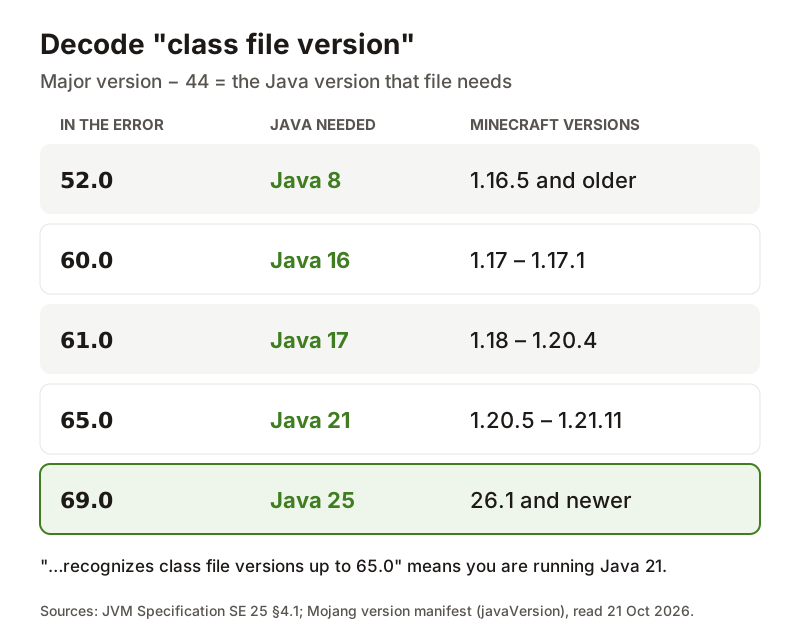
Finding which Java the game actually used
Knowing what Java version for Minecraft is required only helps if the game is actually using it, and java -version tells you about your terminal, not about Minecraft. To see what the game ran on, open the crash report or the latest.log for that instance. Crash reports end with a System Details section that includes a Java Version line and the path of the runtime, which is the authoritative answer.
In Prism, the instance's log window prints the Java path and version at the top of every launch. On a server, the first lines of the console output and logs/latest.log do the same.
If the version shown there does not match the table, you have found your problem. Our crash report guide walks through the rest of a report once the Java line checks out.
Servers: install Java yourself and pin it
A dedicated server has no launcher choosing a runtime for it. It runs on whatever java its start command finds, which on a machine that has had Java installed for something else is often the wrong one. The answer to what Java version for Minecraft servers need is the same table: a 26.3 server, vanilla or modded, needs Java 25; a 1.20.1 Forge server needs Java 17.
Call the runtime by its full path in the start script so a system update cannot change it underneath you. On a rented server, use the host's Java version selector in its control panel instead, and set it to match the pack rather than leaving the default.
The 26.1 changelog's new 4 GB default and ZGC apply to the official launcher's client profiles. A server uses the -Xmx value and flags in your start command, so set memory there.
Pin the runtime in a server start script (Linux example)
# Relies on PATH, which can change:
java -Xmx6G -jar server.jar nogui

# Explicit, survives other Java installs:
/usr/lib/jvm/temurin-25-jdk-amd64/bin/java -Xmx6G -jar server.jar nogui

# Folder names vary by package; ls /usr/lib/jvm shows yours.
Playing an older version: downgrading without losing worlds
Most modded players are not on 26.3. On 21 October 2026, Modrinth listed 25,280 Forge mods for 1.20.1 and 21,514 NeoForge mods for 1.21.1, against 8,116 Fabric mods for 26.3, so going back a version is often the right move for a big pack. In the official launcher, open Installations, choose New installation, pick the version from the list, give it a clear name such as '1.20.1 Forge', and set its own Game directory so its mods, configs and saves stay separate. The launcher fetches the matching Java the first time you play it.
Worlds only move forward. Opening a world in a newer version upgrades it, and an upgraded world should never be opened in an older version again. 26.1 made this stricter: Mojang's changelog says it changed how worlds are stored on disk, moving each dimension into a dimensions folder and player data into a players folder, and worlds that need converting show an Upgrade and Play button. Copy the world's folder somewhere outside the game directory before any version change, and treat a downgraded installation as needing its own worlds.
- Back up the saves folder outside the game directory.
- Create a new installation for the older version; never edit your current one.
- Give it its own Game directory, named after the version and loader.
- Install the loader for that version, then the mods built for that version.
- If you use Prism or a server, select the Java version from the table for that instance.
JRE or JDK?
Adoptium and other vendors offer a JRE, which is just the runtime, and a JDK, which adds development tools such as the compiler. Either one runs the game, the loader installers and a server.
Take the JDK if you are unsure. Some tools expect utilities that only ship with it, and you will need it anyway if you ever build a mod yourself. The only cost is disk space.
Questions people actually ask
- Should I use Java 21 or 25 for Minecraft?
- Java 25 for 26.1, 26.2, 26.3 and newer; Java 21 for 1.20.5 through 1.21.11, including 1.21.1. 26.x will not start on Java 21. The official launcher picks the right one by itself, so this only matters for Prism, installers and servers.
- Is Java 25 or 26 better for Minecraft?
- Use Java 25. It is the version Minecraft 26.x requires and ships with, and it is the current long-term support release. Java 26 and 27 are short-support feature releases, and no Minecraft version asks for them.
- Should I use Java 8 or 17?
- Java 8 for Minecraft 1.16.5 and older, including 1.12.2 packs. Java 17 for 1.18 through 1.20.4, which covers 1.20.1, the most-modded version. 1.17 and 1.17.1 are the odd ones out and use Java 16.
Sources & further reading
- Mojang — Java Edition version manifest (javaVersion per version)
- Minecraft Java Edition 26.1 changelog (Java 25, Microsoft OpenJDK, memory, world storage)
- Oracle — JVM Specification SE 25, chapter 4 (class file versions)
- Adoptium — available releases API
- Adoptium — Temurin downloads
- Fabric Documentation — Installing Java on Windows
- Prism Launcher Wiki — Installing Java
Read next
- How to Read a Minecraft Crash Report
How to read a Minecraft crash report: where it is in each launcher, the five lines that matter, what Caused by means, and a free analyzer that names the mod.
- Minecraft Exit Code 1
Minecraft exit code 1 only means the game stopped with an error. See what 1, -1, 0 and -1073741819 mean, where the log is in each launcher, and the fix.
- Minecraft Server RAM Allocation
Minecraft server RAM allocation calculator for servers and your own PC: a starting -Xmx for your mods and players, and where to set it in every launcher.
- Minecraft Forge vs Fabric vs NeoForge: Which Loader for Your Version
Minecraft Forge vs Fabric, plus NeoForge, decided by version: live Modrinth mod counts, the right loader for 1.20.1, 1.21.1 and 26.x, and where Quilt fits.
- Minecraft Mod Loader Status: Is Fabric, Forge, NeoForge, OptiFine or Sodium Out Yet?
Minecraft mod loader status, live: Fabric, Forge, NeoForge, OptiFine, Sodium, Iris and Fabric API for each recent version, read hourly from official feeds.
Back to the full How to Mod Minecraft guide for the whole install walkthrough from the beginning.

Sukie · Editor
Sukie runs How to Mod Minecraft. She writes and edits every guide on the site, works through each install path herself before publishing, and rewrites anything that turns out to be wrong. The focus here is narrow on purpose: getting mods, loaders and modded servers working without wading through forum threads.
About this site · How guides are checked · Last updated October 21, 2026
NOT AN OFFICIAL MINECRAFT PRODUCT. NOT APPROVED BY OR ASSOCIATED WITH MOJANG OR MICROSOFT.