Guide
Minecraft Mod Loader Status: Is It Out for My Version Yet?
Short answer: Check the board above: it reads Mojang, Fabric, Forge, NeoForge, Quilt, OptiFine and Modrinth every hour. On 21 October 2026, for Minecraft 26.3, Fabric, NeoForge, Fabric API, Sodium and Iris were all out; Forge had a latest build but no recommended one; OptiFine had nothing. 26.4 was still in snapshots, which are not for modded worlds.
Live status board
Is it out for my Minecraft version yet?
- Latest release
- 26.3
- 2026-09-15
- Needs Java
- Java 25
- per Mojang
- Next (snapshot)
- 26.4-snapshot-5
- not for modding
- Fabric Loader
- 0.19.5
- Quilt 0.30.1
| Minecraft | Java | Fabric | Forge | NeoForge | OptiFine | Fabric API | Sodium | Iris |
|---|---|---|---|---|---|---|---|---|
| 26.3 | Java 25 | supported | latest: 66.0.13 | 26.3.0.95 | not yet | 0.164.0+26.3 | mc26.3-0.9.2-neoforge | 1.11.7+26.3-neoforge |
| 26.2 | Java 25 | supported | 65.1.0 | 26.2.0.93 | preview: HD U K2 pre5 | 0.161.0+26.2 | mc26.2-0.9.2-neoforge | 1.11.4+26.2-neoforge |
| 26.1.2 | Java 25 | supported | 64.1.0 | 26.1.2.122 | preview: HD U K1 pre2 | 0.155.3+26.1.2 | mc26.1.2-0.9.2-fabric | 1.11.4+26.1-neoforge |
| 1.21.1 | Java 21 | supported | 52.1.0 | 21.1.264 | release: HD U J1 | 0.116.17+1.21.1 | mc1.21.1-0.8.13-neoforge | 1.8.12+1.21.1-neoforge |
| 1.20.1 | Java 17 | supported | 47.4.10 | none | release: HD U I6 | 0.92.12+1.20.1 | mc1.20.1-0.5.13-fabric | 1.7.6+1.20.1 |
green stable release · amber beta, preview or Forge “latest” (no recommended build yet) · red nothing published. Download only from each project’s own site, CurseForge or Modrinth.
Minecraft mod loader status is the question every new Minecraft release brings back: is Fabric out, is Forge out, has Sodium or OptiFine updated, can I move my modded game yet? The board above answers it for the versions people actually play, straight from each project's own feed, and refreshes every hour.
This page explains how to read it, what each project's labels mean, how quickly things have shipped after recent releases, and what to do on the day a new version lands.
How to read the board
Each row is a Minecraft version. The board always shows the newest patch of the three newest release lines, so it moves forward on its own when Mojang ships a version, plus 1.21.1 and 1.20.1, because that is where most modded players still are and where most of the large modpacks live.
The Java column is the runtime Mojang's own version metadata names for that version: Java 25 for every 26.x release, Java 21 for 1.21.1, Java 17 for 1.20.1. If you run Prism Launcher, a loader installer or a server, that is the Java you need.
The next three columns are the loaders. Fabric shows 'supported' when Fabric's metadata service lists that Minecraft version as a stable game version. Forge shows its recommended build in green when one exists, or its latest build in amber when there is no recommended build yet. NeoForge shows its newest build, amber while it still carries a beta suffix.
OptiFine shows the newest build listed on optifine.net for that version, labelled preview or release. The last three columns come from Modrinth: Fabric API, Sodium and Iris, each showing its newest full release for that version if one exists, or else its newest beta or alpha build.
The older rows read differently from the newest ones. On 1.20.1 and 1.21.1 almost everything is green, because those versions have had years to settle, but green in a mod column only says a full release exists for some loader. Sodium's 1.20.1 builds, for example, are Fabric and Quilt only, so a Forge 1.20.1 player still needs a fork such as Embeddium. When a cell matters to your setup, click through to the mod's own page and filter by your loader.
Colours mean the same thing everywhere: green is a stable release, amber is beta, alpha, preview or a Forge latest-only build, and red means nothing has been published yet. The cards above the table show Mojang's latest release and its newest snapshot, the current Fabric loader and Quilt loader versions.
What beta, latest, preview and recommended actually mean
Each project labels its builds differently, and the labels are the most useful thing on the board once you know how to read them.
Forge publishes a promotions feed with two pointers per Minecraft version: latest, which is simply the newest build, and recommended, which the Forge team sets once it considers a build stable for general use. A version that only has latest is usable but young. On 21 October 2026, Forge 26.3 had a latest build and no recommended build, while 26.2's recommended build had been set by late July, about six weeks after 26.2's release.
NeoForge marks early builds with a beta suffix. Its 26.1 announcement explains that while a version carries the suffix, breaking changes are still allowed, which matters to mod authors more than to players: mods can need updating between beta builds. For 26.3, NeoForge's first build was a beta uploaded on release day, and the first build without the suffix arrived on 11 October 2026.
Fabric is different because the loader is not tied to one Minecraft version. Fabric's metadata service marks each Minecraft version as stable or not, and the loader itself as stable or not; the board's Fabric column shows whether the Minecraft version is listed as stable. Fabric API, the library most Fabric mods need, is published per Minecraft version on Modrinth.
OptiFine has two states: preview, a test build that can have bugs or missing features, and a full release. Modrinth projects such as Sodium and Iris choose release, beta or alpha for each upload themselves. A mod can have both: on 26.3, Sodium published a full release on release day and later uploaded newer alpha and beta builds, so the board shows the full release in green.
Quilt, the Fabric fork, publishes its loader through its own metadata service; its newest loader builds on 21 October 2026 were labelled beta.
How long things took after 26.2 and 26.3
Minecraft mod loader status changes fastest in the first weeks after a release. There are no promised dates for any of these projects, so the only honest guide is what happened last time. We took Mojang's release dates from its version manifest and the first upload date for each project's build from the project's own Maven repository or Modrinth listing.
Two patterns stand out. Fabric and the Modrinth performance mods had builds ready on release day both times, because Fabric publishes for pre-releases and snapshots, not only finished versions: Fabric's metadata already listed the 26.4 snapshots on 21 October 2026, and Fabric API had builds for them within a day of each snapshot. NeoForge also had beta builds on release day both times, with its first non-beta build arriving weeks later. Forge's first builds took two to four days, and its recommended build took about six weeks on 26.2.
At the slow end, OptiFine and Sinytra Connector each took around four months to reach 26.2 at all, and neither had a 26.3 build on 21 October.
| Project | 26.2 (released 16 Jun 2026) | 26.3 (released 15 Sep 2026) |
|---|---|---|
| Fabric API | Before release (15 Jun) | Before release (pre-release builds from 3 Sep) |
| Sodium | Release day | Release day, full release |
| Iris | Release day | Release day (Fabric); 15 days (NeoForge) |
| NeoForge, first beta | Release day | Release day |
| NeoForge, first non-beta | 54 days (9 Aug) | 26 days (11 Oct) |
| Forge, first build | 2 days (18 Jun) | 4 days (19 Sep) |
| Forge, recommended build | 41 days (27 Jul) | None on 21 Oct |
| OptiFine, first preview | 98 days (22 Sep) | None on 21 Oct |
| Sinytra Connector | 120 days (14 Oct, beta) | None on 21 Oct |
What to do on release day
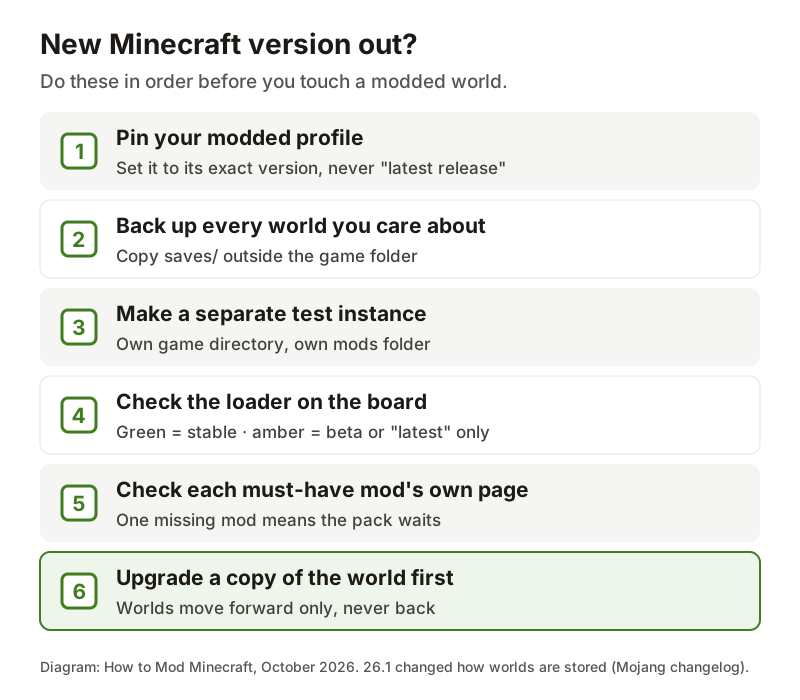
A new Minecraft version is a reason to test, not a reason to update your real game. The steps below are the ones that protect your worlds, in order.
First, pin your modded profile. In the official launcher, edit the installation and set its version to the exact release your loader was installed for, never 'latest release'. Otherwise the launcher can move the profile to the new version on its own, and every mod in it stops loading at once. Prism instances are pinned already.
Second, back up. Copy each world you care about out of the saves folder to somewhere outside the game directory. This matters more than it used to: Minecraft 26.1 changed how worlds are stored on disk, moving each dimension into a dimensions folder and player data into a players folder, and Mojang's changelog notes that worlds needing conversion now show an Upgrade and Play button. A world that has been upgraded should not be opened in an older version again.
Third, make a separate test instance for the new version with its own game directory and mods folder, and install the loader there. Use the board to see which loader is green. Remember that 26.x needs Java 25, which the official launcher handles but Prism and servers need installed.
If you run a server for friends, hold it on its current version until every player can follow. A Java Edition client has to match the server's Minecraft version to join, and on a modded server everyone also needs the same loader and the same client-side mods. Update the server last, after the test instance has run the new version with your full mod list, and keep the backup of the old world until the group has played on the new one for a while.
Fourth, check every must-have mod on its own Modrinth or CurseForge page for the new version. When they are all there, upgrade a copy of your world in the test instance and play it for a while before you move your main save. Snapshots, such as the 26.4 snapshots on 21 October 2026, are for previewing vanilla features; even when Fabric supports them, mods break from one snapshot to the next.
Where the data comes from and how often it refreshes
Every cell of this Minecraft mod loader status board comes from the project that publishes the thing it describes. Minecraft versions come from Mojang's version manifest at piston-meta.mojang.com, and the Java column from each version's own metadata. Fabric comes from meta.fabricmc.net, Forge from its promotions feed at files.minecraftforge.net, NeoForge from the version list in its Maven repository, Quilt from meta.quiltmc.org, OptiFine from the download page at optifine.net, and Fabric API, Sodium and Iris from the Modrinth API.
The page fetches these feeds and keeps the result for up to an hour, then fetches them again on the next visit. That means a new build can take up to an hour to appear here. If you need the very latest minute, each project's own page is linked from the board.
If a feed cannot be read, its column says 'unavailable' rather than showing an old or guessed value. A red 'not yet' means the feed was read successfully and listed nothing for that version.
The board does not track every mod. For anything else, open the mod's own page and filter its files by your Minecraft version and loader. Download only from the project's own site, Modrinth or CurseForge.
Questions people actually ask
- Is Sodium out for 26.3?
- Yes. Sodium published full 26.3 releases for Fabric and NeoForge on 15 September 2026, the day 26.3 came out, and has since uploaded newer alpha and beta builds. The board shows the newest full release in green.
- Is Fabric API out for 26.3?
- Yes. Fabric API had builds for the 26.3 pre-releases from 3 September 2026 and for 26.3 itself from before its release. Fabric API is published per Minecraft version, so make sure the file you download says 26.3.
- Is NeoForge out for 26.3?
- Yes. NeoForge uploaded its first 26.3 build, marked beta, on release day, and its first build without the beta suffix on 11 October 2026. The board shows the newest build and whether it is still beta.
- Is OptiFine out for 26.3?
- Not on 21 October 2026. optifine.net listed nothing for 26.3, and 26.2 had preview builds only. Our OptiFine page tracks it live and shows how long previous versions took.
- When will my mods update to the new version?
- Each mod updates on its own author's schedule, and no project on the board promises dates. Loaders and the big performance mods have recently been ready within days; large content mods and modpacks often take weeks or months. Check each mod's own page.
Sources & further reading
- Mojang — Java Edition version manifest
- Fabric meta — game versions, loader and installer
- MinecraftForge — promotions feed
- NeoForged Maven — NeoForge versions
- NeoForged — NeoForge for Minecraft 26.1 (version scheme and beta suffix)
- QuiltMC meta — loader versions
- OptiFine — official downloads
- Modrinth API — project versions
- Minecraft Java Edition 26.1 changelog (world storage)
Read next
- When Will OptiFine Update? Live Status, Release History and What to Use Meanwhile
When will OptiFine update for 26.3? No date is announced. See live OptiFine status, how long past versions took, and the Sodium + Iris setup to use meanwhile.
- Minecraft Forge vs Fabric vs NeoForge: Which Loader for Your Version
Minecraft Forge vs Fabric, plus NeoForge, decided by version: live Modrinth mod counts, the right loader for 1.20.1, 1.21.1 and 26.x, and where Quilt fits.
- What Java Version for Minecraft? The Full Table for Every Version
What Java version for Minecraft: 26.1+ needs Java 25, 1.20.5–1.21.11 Java 21, 1.18–1.20.4 Java 17, older Java 8. Full table, error decoder, install steps.
- How to Install Fabric for Minecraft
How to install Fabric on Windows, macOS and Linux, in Prism, Modrinth App and CurseForge, and on a server, plus Fabric API, Java 25 and fixes.
- How to Read a Minecraft Crash Report
How to read a Minecraft crash report: where it is in each launcher, the five lines that matter, what Caused by means, and a free analyzer that names the mod.
Back to the full How to Mod Minecraft guide for the whole install walkthrough from the beginning.

Sukie · Editor
Sukie runs How to Mod Minecraft. She writes and edits every guide on the site, works through each install path herself before publishing, and rewrites anything that turns out to be wrong. The focus here is narrow on purpose: getting mods, loaders and modded servers working without wading through forum threads.
About this site · How guides are checked · Last updated October 21, 2026
NOT AN OFFICIAL MINECRAFT PRODUCT. NOT APPROVED BY OR ASSOCIATED WITH MOJANG OR MICROSOFT.